
Clio Legal Software Costs: What Law Firms Should Budget for in 2026–2027

The listed price of Clio legal software is the easiest number to find and the least complete one. A firm planning for late 2026 and 2027 needs the full annual cost: seats, plan tier, payment fees, connected apps, data migration, and the staff hours a switch takes.
As of October 2, 2026, the Clio pricing page lists Starter from $49 per user per month in the United States. Core, Signature, and Elite are quote-only. That gives a firm a clear starting point and very little else, so the useful approach is to build the budget in layers and label each layer as fixed, variable, or still unknown.
Key Takeaways
These are the cost checks to carry into any Clio legal software budget for the coming year.
- Only Starter Has a Public Price: Starter starts at $49 per user per month. Core, Signature, and Elite require a quote, so most firms cannot finish a budget from the website alone.
- Ten Starter Seats Cost $5,880 a Year: That is $49 × 10 seats × 12 months, before add-ons, payment fees, or any discount for annual billing.
- Payment Fees Can Outgrow the Subscription: At 2.95% per card payment, a firm collecting $25,000 a month by card pays about $8,850 a year in fees, more than ten Starter seats cost.
- Connected Apps Are Billed Separately: Many integrations carry their own monthly subscriptions, so the app list belongs in the budget, not only the Clio invoice.
- Every Rate Needs a Final Recheck: Plans, features, and fees change. Date each figure in the budget and confirm it again before signing.
What Clio Pricing Is Public for 2026–2027 Planning?
Clio's U.S. pricing page names four Clio Manage plans. Only one shows a price. The table below summarizes what the page states for each plan as of October 2, 2026.
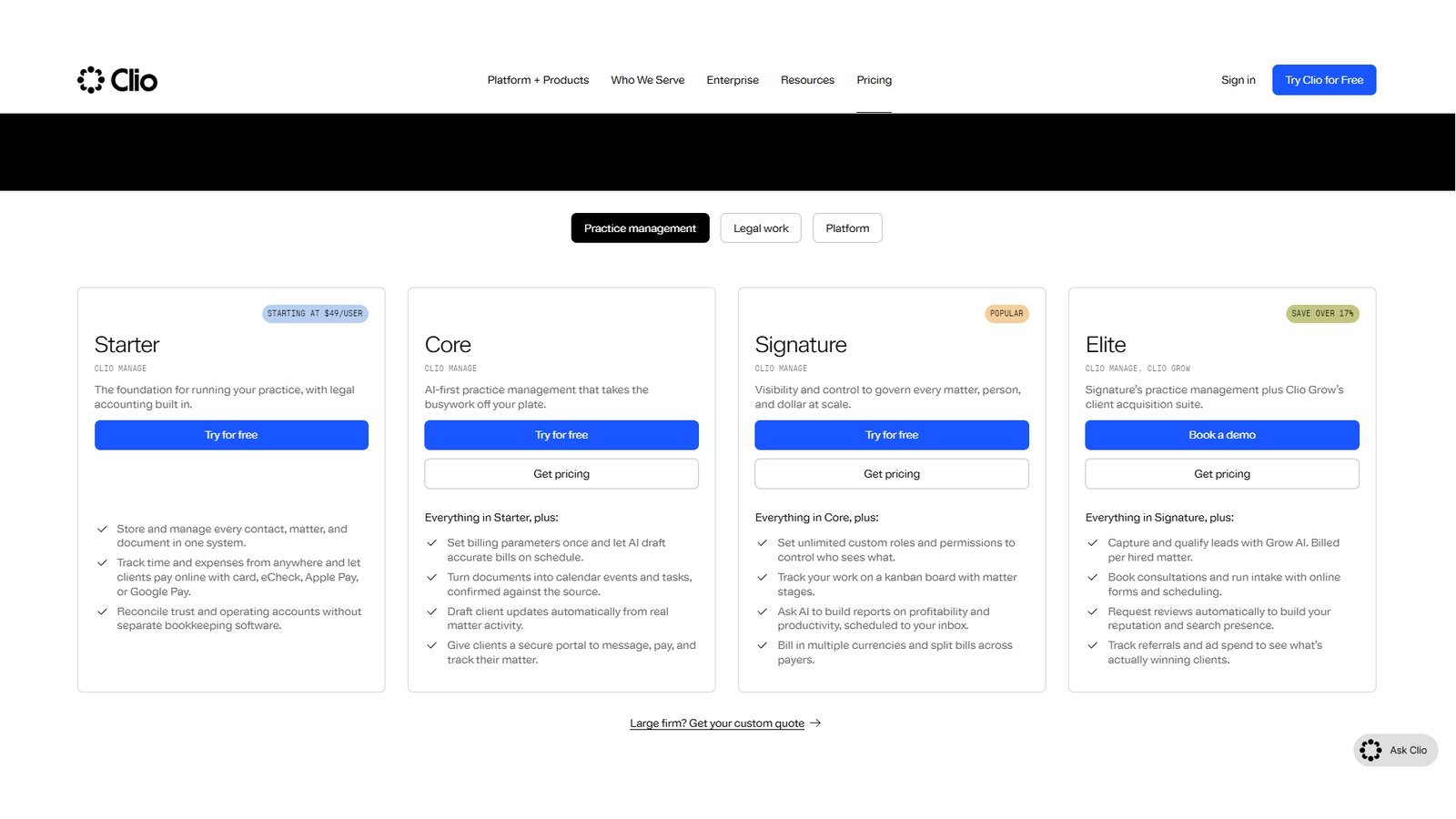
| Plan | Public Price | AI Included | Accounting Included | Clio Grow |
|---|---|---|---|---|
| Starter | From $49 per user per month | No | Yes | Not listed as an option |
| Core | Quote required | Yes | Yes | Available as an add-on |
| Signature | Quote required | Yes | Yes | Available as an add-on |
| Elite | Quote required | Yes | Yes | Included |
Two details on that page matter for budgeting. First, Clio says AI is included on Core and above rather than sold separately, which changes how a firm compares plans with other AI tools it already pays for. Second, Clio says plans can be canceled at any time, with cancellation taking effect at the end of the current monthly or annual term. A firm on annual terms is committed for that year.
What Starter Costs at Different Team Sizes
Starter is the one tier a firm can price without a sales call. The chart below shows the annual subscription at four team sizes using the listed starting rate.
The math is simple, but it shows why seat count drives the budget. Moving from 5 to 25 users raises the Starter subscription from $2,940 to $14,700 a year. A per-user system that looks inexpensive for one lawyer grows quickly once paralegals, intake staff, and billing staff need their own logins.
What the Quote-Only Tiers Mean for a Budget
For Core, Signature, and Elite, the budget line stays blank until Clio sends a written quote. That quote should state the per-user rate, the billing term, which add-ons are included, and what renewal pricing looks like. Without those four items, a firm cannot compare Clio legal software fairly with another platform's offer.
Build the Budget in Five Cost Layers
A single "software cost" line hides most of the spending. Splitting the budget into five layers makes each cost visible and shows which numbers are still missing.
| Cost Layer | Examples | Fixed or Variable | How to Price It |
|---|---|---|---|
| User licenses | Attorneys, paralegals, intake and billing staff | Fixed per seat | Published rate or written quote |
| Higher tiers and add-ons | Core, Signature, Elite, Clio Grow, Clio for Personal Injury | Fixed per term | Written quote |
| Payment processing | Card, American Express, Pay Later, eCheck | Variable | Rate × expected payment volume |
| Connected apps | Accounting, document, research, reporting tools | Fixed or usage-based | Each vendor's own price |
| Migration and internal time | Data cleanup, testing, training, go-live | Mostly one-time | Written scope plus staff hours |
The first two layers come from Clio. The last three depend on how the firm works, which is why two firms with the same quote can end up with very different annual totals.
Layer One and Two: Seats, Tiers, and Add-Ons
Start with the people who need access under the planned workflow, then confirm with Clio which roles need paid seats on the chosen plan. Next, list the add-ons. Clio's pricing page names Clio Grow, its intake and CRM product, which is included in Elite, and Clio for Personal Injury as add-ons. Ask for each one to appear as its own line in the quote.
Layer Three to Five: Fees, Apps, and the Switch
The remaining layers are where budgets usually miss. Payment fees scale with revenue, connected apps renew on their own schedules, and the switch itself takes staff time that never appears on an invoice. The next sections take each in turn.
How Much Do Clio Payment Fees Add?
Clio Payments is built into Clio Manage, so many firms use it by default. The fees are a percentage of every payment collected, which makes them a variable cost that grows with the firm. Clio's payments comparison page lists 2.95% for standard cards and 3.75% for American Express, and the Clio Help Center lists 4.95% per transaction for Pay Later with Affirm.
The table below turns those rates into a cost per $1,000 collected, which is easier to apply to a firm's own revenue.
| Payment Method | Listed Rate | Fee per $1,000 Collected | Who Pays |
|---|---|---|---|
| Standard credit or debit card | 2.95% | $29.50 | Firm |
| American Express | 3.75% | $37.50 | Firm |
| Pay Later with Affirm | 4.95% | $49.50 | Firm, never the client |
| eCheck | Not published on these pages | Confirm in quote | Confirm in quote |
The Help Center adds three useful limits. Pay Later applies to payments from $50 to $30,000, each eCheck has a $25,000 limit, and for trust requests the Pay Later fee comes out of the operating account, never the trust account.
When Payment Fees Exceed the Subscription
Because the fee is a percentage, it can pass the subscription cost at modest volumes. The comparison below holds ten Starter seats constant and changes only the amount a firm collects by card each month.
Illustration: 10 Starter seats vs. card fees at three collection levels
- 10 Starter seats, per year
- Card fees at 2.95%, per year
View chart data
| Card payments collected per month | 10 Starter seats, per year | Card fees at 2.95%, per year |
|---|---|---|
| $10,000 per month | $5,880 | $3,540 |
| $25,000 per month | $5,880 | $8,850 |
| $50,000 per month | $5,880 | $17,700 |
At $10,000 a month in card payments, fees run about $3,540 a year, well under the $5,880 subscription. At $25,000 a month they reach $8,850, and at $50,000 they reach $17,700, three times the subscription. Firms that collect a large share of revenue online should model fees from their actual payment mix, using the same collection data they track in law firm billing statistics.
Why the Fee Rates Need Rechecking
Clio's own pages have not always agreed. An older Clio payments page still shows 3.5% for American Express and 1% for eCheck, while the current comparison page lists 3.75% for American Express and gives no eCheck percentage. Use the current pages for planning, then ask Clio to confirm every rate in writing before signing. A separate breakdown of LawPay legal payments shows how another processor prices card, eCheck, and Pay Later transactions.
What Do Integrations and Migration Add?
"Works with Clio" means the tools connect. It does not mean the other product is included. The Clio App Directory lists free integrations alongside paid ones billed monthly, yearly, per transaction, or by quote. A firm keeping its accounting, document management, e-filing, or reporting tools should count each subscription.
| Tool the Firm Uses Today | Keep, Replace, or Drop | Billed By | Annual Cost to Budget |
|---|---|---|---|
| Accounting software | Decide before quote | Accounting vendor | Vendor's current price |
| Document management | Decide before quote | Document vendor | Vendor's current price |
| Intake or CRM tool | Compare with Clio Grow | Intake vendor or Clio | Vendor price or Clio quote |
| Reporting or analytics | Decide before quote | Reporting vendor | Vendor's current price |
| Sync or connector apps | Needed only if tools stay | Connector vendor | Vendor's current price |
Tool availability is not the same as tool use. As the gap between adoption and daily use in legal technology statistics shows, a licensed app that staff rarely open still costs money every month.
Migration is the other layer that hides in plain sight. Clio offers migration help, but someone inside the firm still has to decide what data moves, clean old records, test billing and trust workflows, and train staff. Those hours belong in the budget. Time tracking is another place where platforms differ once they are live, as the look at Smokeball automatic time capture shows. Firms with complex systems face a longer rollout, as the Litify implementation analysis describes.
What Should a Law Firm Ask Before Signing?
A pricing call works best when the firm already knows which gaps it needs to close. These eight questions turn a sales conversation into a complete budget.

| Question | Why It Changes the Budget |
|---|---|
| Which roles need paid seats on this plan? | Seat count is the largest fixed cost |
| Which needed features require Core, Signature, or Elite? | Moves the firm from a public price to a quote |
| Which add-ons are in the quote, line by line? | Prevents surprise charges after signing |
| Is pricing monthly or annual, and what is the renewal rate? | Sets the real commitment and next year's cost |
| What are the current card, American Express, Pay Later, and eCheck rates? | Drives the variable cost |
| Which data will Clio migrate, and what must the firm handle? | Defines the one-time cost and staff time |
| What training and setup are included? | Affects how fast staff become productive |
| Who owns go-live inside the firm? | Keeps the switch from stalling |
Ask for the answers in writing. A quote that lists every rate, term, and included service is the only fair basis for comparing Clio with another platform.
Is Clio Legal Software Expensive?
There is no single answer, because the total depends on team size, plan tier, payment volume, and the tools a firm keeps. For a small firm that needs only Starter, Clio legal software can be priced from the website in minutes. For a larger firm on a quote-only plan with heavy card collections and several paid apps, the subscription may be the smaller part of the annual total.
The fair comparison is the full annual cost of the workflow a firm needs, not one vendor's starting price against another's. Switching costs and staff time also show up in margins, which is why this decision connects to law firm profitability statistics.
Frequently Asked Questions
The questions below cover the Clio legal software pricing points firms most often get wrong.
What Does Clio Legal Software Cost in 2026?
Starter is listed from $49 per user per month in the United States as of October 2, 2026. Core, Signature, and Elite require a quote, so there is no public all-in price.
Is Clio Priced Per User?
Yes. Starter is listed per user per month. Confirm with Clio which roles need paid seats on the plan the firm chooses.
What Are Clio's Payment Processing Fees?
Clio lists 2.95% for standard cards, 3.75% for American Express, and 4.95% for Pay Later with Affirm. The eCheck rate is not published on these pages, so confirm it in the quote.
Can a Firm Use 2026 Pricing for a 2027 Budget?
Yes, as a dated starting point. Recheck the plan price, payment fees, and connected-app costs before approving a 2027 purchase.
Resources
These official pages were checked on October 2, 2026. Rates and plans change, so recheck them before any purchase decision.
- Clio Pricing: Clio Legal AI Software Pricing and Plans
- Clio Payments Rates: Get Paid Faster With Legal Payment Processing Software
- Pay Later and eCheck Limits: Clio Help Center, Accepted Payment Methods
- Connected Apps: Clio App Directory
- Migration Scope: Clio Data Migration
- Older Payments Page: Clio Billing and Collections (earlier rates)